액추에이터 제어 노드 실습
액추에이터 제어는 센서 수신과 반대로 PC에서 로봇으로 명령을 보내는 과정입니다. 이 실습에서는 로봇이 없는 환경에서도 연습할 수 있도록 액추에이터 시뮬레이션 클라이언트를 실행하고, 직접 만든 Python 노드에서 키와 쓰러스터 제어 명령을 발행합니다.
이 실습에서 작성하는 제어 노드는 /actuator/key/degree와 /actuator/thruster/percentage로 명령을 발행합니다.
실제 로봇이 연결된 상태에서는 키 또는 쓰러스터가 움직일 수 있으므로, 먼저 시뮬레이션 클라이언트로 실습하세요.
액추에이터 시뮬레이션 클라이언트는 mechasolution/actuator_client_simulation을 사용합니다. 제어 노드는 ROS 2 Jazzy 공식 문서의 Python publisher/subscriber 예제를 바탕으로 작성합니다.
액추에이터 시뮬레이션 클라이언트 설치
워크스페이스의 src 폴더에 시뮬레이션 클라이언트 패키지를 복제합니다.
$ cd ~/ros2_ws/src
~/ros2_ws/src$ git clone https://github.com/mechasolution/actuator_client_simulation.git
패키지를 빌드하고 환경을 적용합니다.
$ cd ~/ros2_ws
~/ros2_ws$ colcon build --packages-select actuator_client_simulation
~/ros2_ws$ source install/setup.bash
액추에이터 시뮬레이션 클라이언트를 실행합니다.
$ ros2 run actuator_client_simulation simulated_mcu_node
[INFO] [1784524380.141745633] [mcu_node]: simulated mcu node started
[INFO] [1784524380.141913924] [mcu_node]: subscribed: /actuator/key/degree
[INFO] [1784524380.142055383] [mcu_node]: subscribed: /actuator/thruster/percentage
[INFO] [1784524381.139784258] [mcu_node]: current actuator command | key=0.0 deg, thruster=0.0 %
[INFO] [1784524382.138521259] [mcu_node]: current actuator command | key=0.0 deg, thruster=0.0 %
[INFO] [1784524383.138633759] [mcu_node]: current actuator command | key=0.0 deg, thruster=0.0 %
# (생략)
이 노드는 실제 로봇의 mcu_node처럼 액추에이터 제어 토픽을 구독합니다.
수신한 명령은 실제 하드웨어로 보내지 않고 터미널 로그로만 출력합니다.
토픽 확인
새 터미널을 열고 현재 활성화된 토픽 목록을 확인합니다.
$ ros2 topic list
/actuator/key/degree
/actuator/thruster/percentage
/parameter_events
/rosout
키 제어 토픽의 메시지 타입과 QoS를 확인합니다.
$ ros2 topic info -v /actuator/key/degree
Type: std_msgs/msg/Float64

Publisher count: 0

Subscription count: 1

Node name: mcu_node
Node namespace: /
Topic type: std_msgs/msg/Float64
Topic type hash: INVALID
Endpoint type: SUBSCRIPTION
GID: 01.0f.8a.a3.da.18.b8.fa.00.00.01.00.00.00.03.04
QoS profile:
  Reliability: RELIABLE
  History (Depth): UNKNOWN
  Durability: VOLATILE
  Lifespan: Infinite
  Deadline: Infinite
  Liveliness: AUTOMATIC
  Liveliness lease duration: Infinite
쓰러스터 제어 토픽도 같은 방식으로 확인합니다.
$ ros2 topic info -v /actuator/thruster/percentage
Type: std_msgs/msg/Float64

Publisher count: 0

Subscription count: 1

Node name: mcu_node
Node namespace: /
Topic type: std_msgs/msg/Float64
Topic type hash: INVALID
Endpoint type: SUBSCRIPTION
GID: 01.0f.8a.a3.da.18.b8.fa.00.00.01.00.00.00.04.04
QoS profile:
  Reliability: RELIABLE
  History (Depth): UNKNOWN
  Durability: VOLATILE
  Lifespan: Infinite
  Deadline: Infinite
  Liveliness: AUTOMATIC
  Liveliness lease duration: Infinite
두 토픽 모두 메시지 타입은 std_msgs/msg/Float64입니다.
/actuator/key/degree는 키의 조향 각도를 나타내며, 90.0이 중앙입니다.
/actuator/thruster/percentage는 쓰러스터 출력을 나타내며, 0.0은 정지, 양수는 전진, 음수는 후진입니다.
명령을 직접 발행해 시뮬레이션 클라이언트가 수신하는지 확인할 수 있습니다.
$ ros2 topic pub --once /actuator/key/degree std_msgs/msg/Float64 "{data: 80.0}"
$ ros2 topic pub --once /actuator/thruster/percentage std_msgs/msg/Float64 "{data: 50.0}"
[INFO] [1784525611.283951095] [mcu_node]: current actuator command | key=80.0 deg, thruster=50.0 %
[INFO] [1784525611.325239886] [mcu_node]: key degree: 80.0 deg
[INFO] [1784525611.325404720] [mcu_node]: thruster percentage: 50.0 %
앞에서 실행한 simulated_mcu_node 터미널에서 키와 쓰러스터의 상태를 확인할 수 있습니다.
rqt에서 토픽 발행하기
ros2 topic pub 대신 rqt를 활용해 편리하게 메시지를 발행할 수 있습니다.
$ rqt
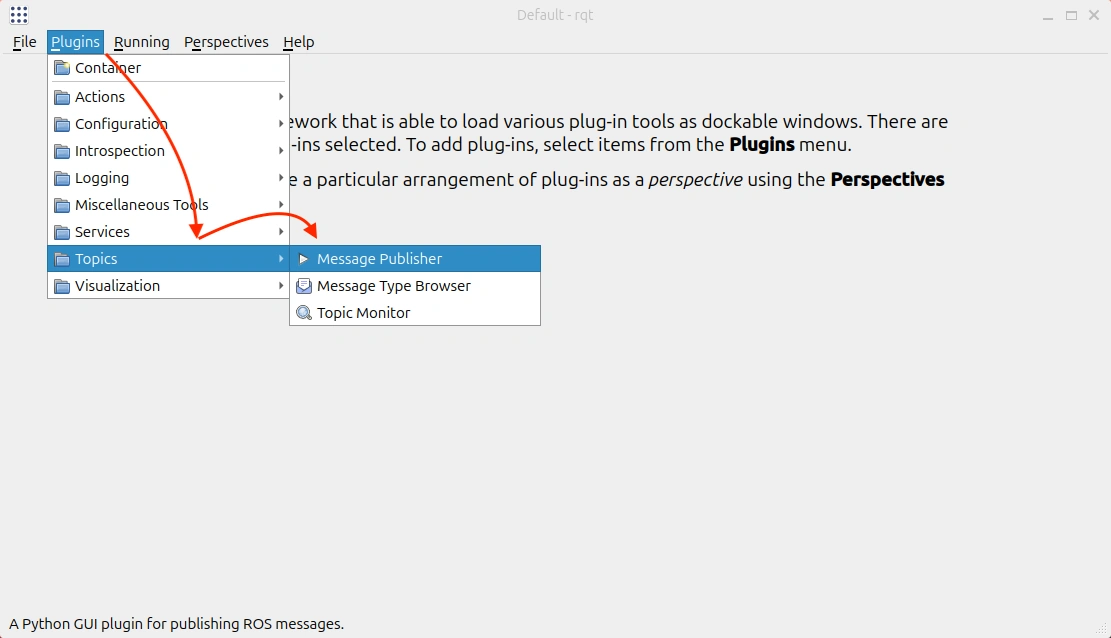
rqt를 처음 사용한다면 Message Publisher 플러그인을 추가합니다.
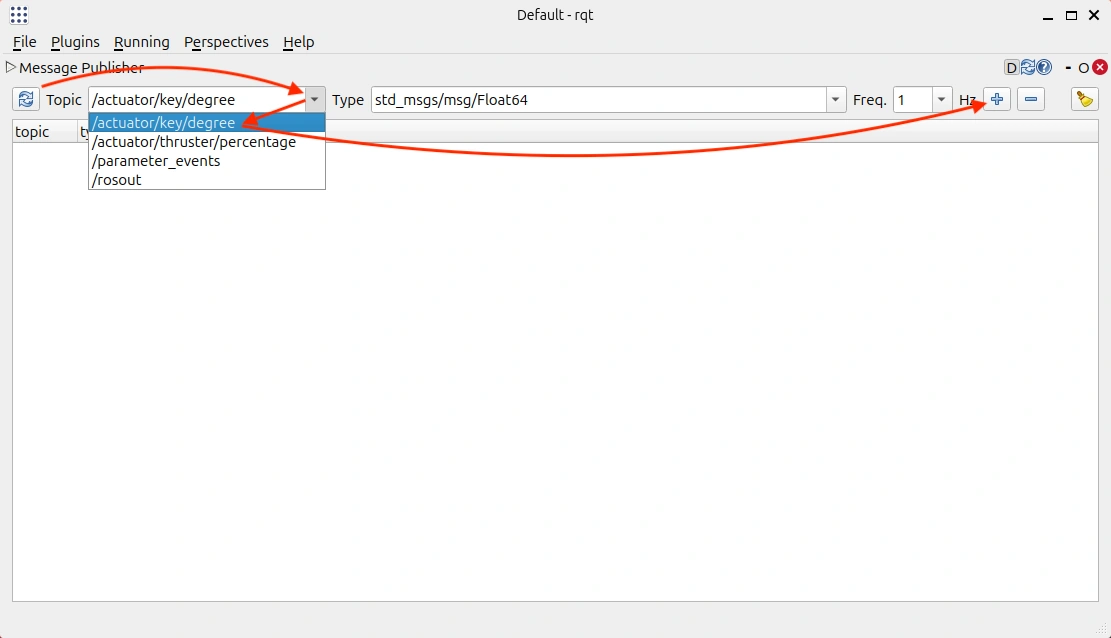
Message Publisher에서 메시지를 발행할 토픽을 선택한 뒤 + 버튼을 클릭해 추가합니다.
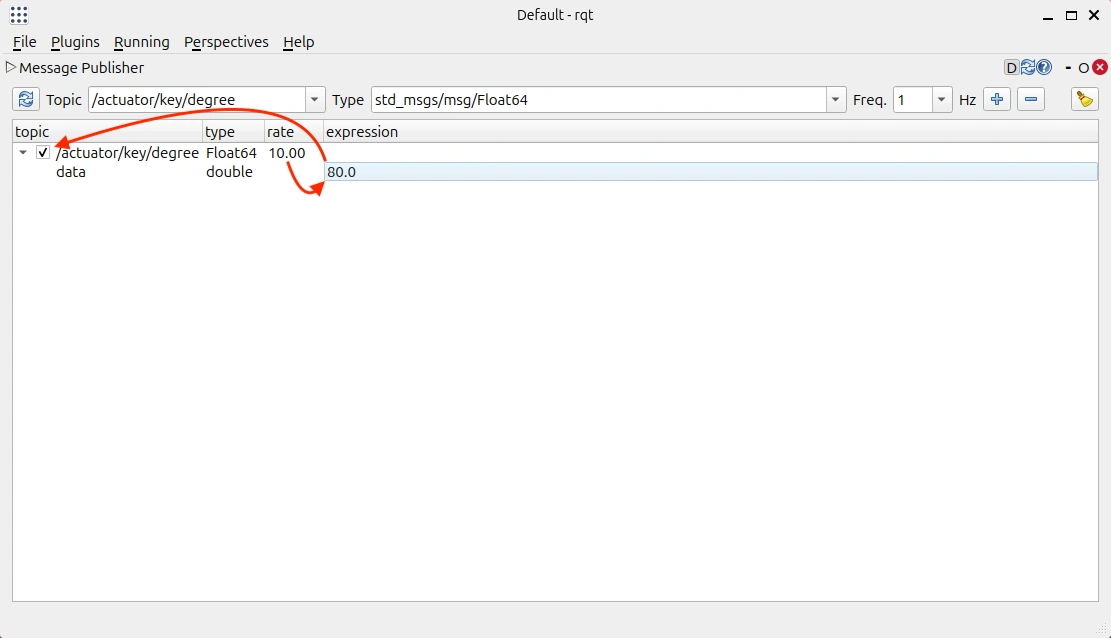
메시지의 발행 주기를 10 Hz로 설정한 뒤, expression에 데이터를 입력합니다.
왼쪽 체크박스를 클릭하면 메시지 발행이 시작됩니다.
제어 패키지 생성
이제 액추에이터 제어 명령을 발행하는 패키지를 만듭니다.
$ cd ~/ros2_ws/src
~/ros2_ws/src$ ros2 pkg create actuator_publish_tutorial \
  --build-type ament_python \
  --dependencies rclpy std_msgs
패키지 안의 Python 모듈 폴더로 이동합니다.
$ cd ~/ros2_ws/src/actuator_publish_tutorial/actuator_publish_tutorial
공식 예제 코드 가져오기
ROS 2 Jazzy 공식 문서의 Python publisher/subscriber 예제 중 minimal publisher 코드를 가져옵니다. 이번 실습은 액추에이터 제어 명령을 보내는 노드를 만드는 것이므로 subscriber가 아니라 publisher 예제를 수정합니다.
$ wget https://raw.githubusercontent.com/ros2/examples/jazzy/rclpy/topics/minimal_publisher/examples_rclpy_minimal_publisher/publisher_member_function.py
$ mv publisher_member_function.py actuator_publisher.py
가져온 예제는 std_msgs/msg/String 타입의 문자열을 topic 토픽으로 발행합니다.
우리는 std_msgs/msg/Float64 타입의 숫자를 /actuator/key/degree와 /actuator/thruster/percentage 토픽으로 발행하도록 수정합니다.
제어 노드 코드 수정
actuator_publisher.py 파일을 아래처럼 수정합니다.
# Copyright 2016 Open Source Robotics Foundation, Inc.
#
# Licensed under the Apache License, Version 2.0 (the "License");
# you may not use this file except in compliance with the License.
# You may obtain a copy of the License at
#
#     http://www.apache.org/licenses/LICENSE-2.0
#
# Unless required by applicable law or agreed to in writing, software
# distributed under the License is distributed on an "AS IS" BASIS,
# WITHOUT WARRANTIES OR CONDITIONS OF ANY KIND, either express or implied.
# See the License for the specific language governing permissions and
# limitations under the License.

import rclpy
from rclpy.node import Node
from std_msgs.msg import Float64


class ActuatorPublisher(Node):

    def __init__(self):
        super().__init__('actuator_publisher')
        self.key_publisher = self.create_publisher(
            Float64,
            '/actuator/key/degree',
            10
        )
        self.thruster_publisher = self.create_publisher(
            Float64,
            '/actuator/thruster/percentage',
            10
        )
        timer_period = 1.0  # seconds
        self.timer = self.create_timer(timer_period, self.timer_callback)
        self.commands = [
            (90.0, 0.0),
            (70.0, 10.0),
            (110.0, 10.0),
            (90.0, 0.0),
            (90.0, -10.0),
            (90.0, 0.0),
        ]
        self.command_index = 0

    def timer_callback(self):
        key_degree, thruster_percentage = self.commands[self.command_index]

        key_msg = Float64()
        key_msg.data = key_degree

        thruster_msg = Float64()
        thruster_msg.data = thruster_percentage

        self.key_publisher.publish(key_msg)
        self.thruster_publisher.publish(thruster_msg)

        self.get_logger().info(
            f'key={key_degree:.1f} deg, '
            f'thruster={thruster_percentage:.1f} %'
        )

        self.command_index = (self.command_index + 1) % len(self.commands)


def main(args=None):
    rclpy.init(args=args)

    actuator_publisher = ActuatorPublisher()

    rclpy.spin(actuator_publisher)

    # Destroy the node explicitly
    # (optional - otherwise it will be done automatically
    # when the garbage collector destroys the node object)
    actuator_publisher.destroy_node()
    rclpy.shutdown()


if __name__ == '__main__':
    main()
공식 예제에서 바꾼 핵심 부분은 다음과 같습니다.
String대신Float64메시지 타입을 import합니다.MinimalPublisher클래스 이름을ActuatorPublisher로 바꿉니다.- 노드 이름을
minimal_publisher에서actuator_publisher로 바꿉니다. - 문자열을 발행하던 publisher 하나를 키와 쓰러스터 publisher 두 개로 바꿉니다.
- 토픽 이름을
topic에서/actuator/key/degree,/actuator/thruster/percentage로 바꿉니다. - 타이머 콜백에서 두 액추에이터 명령을 만들어 발행합니다.
main()에서 생성하는 객체 이름을actuator_publisher로 바꿉니다.
수정한 코드 구문별 설명
먼저 액추에이터 명령에 사용할 메시지 타입을 import합니다.
from std_msgs.msg import Float64
Float64는 64비트 실수 하나를 담는 메시지 타입입니다.
키 각도와 쓰러스터 출력은 모두 숫자 하나로 표현되므로 std_msgs/msg/Float64를 사용합니다.
class ActuatorPublisher(Node):
ActuatorPublisher는 우리가 새로 만든 제어 노드 클래스입니다.
괄호 안의 Node는 이 클래스가 ROS 2 노드 기능을 상속받는다는 뜻입니다.
super().__init__('actuator_publisher')
super().__init__()은 부모 클래스인 Node를 초기화합니다.
괄호 안의 'actuator_publisher'는 ROS 2 그래프에 표시될 노드 이름입니다.
self.key_publisher = self.create_publisher(
    Float64,
    '/actuator/key/degree',
    10
)
create_publisher()는 토픽으로 메시지를 발행하는 publisher를 만듭니다.
첫 번째 인수 Float64는 발행할 메시지 타입입니다.
두 번째 인수 '/actuator/key/degree'는 발행할 토픽 이름입니다.
세 번째 인수 10은 기본 QoS의 큐 깊이입니다.
이 publisher는 키의 조향 각도를 발행합니다.
self.thruster_publisher = self.create_publisher(
    Float64,
    '/actuator/thruster/percentage',
    10
)
두 번째 publisher는 쓰러스터 출력 명령을 발행합니다. 두 액추에이터 토픽은 메시지 타입이 같지만, 토픽 이름과 의미가 다릅니다.
self.commands = [
    (90.0, 0.0),
    (70.0, 10.0),
    (110.0, 10.0),
    (90.0, 0.0),
    (90.0, -10.0),
    (90.0, 0.0),
]
commands는 일정한 순서로 보낼 제어 명령 목록입니다.
각 항목은 (키 각도, 쓰러스터 출력) 형식입니다.
예를 들어 (70.0, 10.0)은 키를 중앙값인 90.0에서 한쪽으로 조향하고 쓰러스터를 전진 방향으로 10.0% 출력하라는 의미입니다.
key_msg = Float64()
key_msg.data = key_degree
Float64()로 새 메시지를 만들고, 실제 숫자는 data 필드에 넣습니다.
std_msgs/msg/Float64는 data 필드 하나만 가진 단순한 메시지입니다.
self.key_publisher.publish(key_msg)
self.thruster_publisher.publish(thruster_msg)
publish()를 호출하면 메시지가 토픽으로 발행됩니다.
시뮬레이션 클라이언트가 실행 중이라면 이 메시지를 받아 터미널에 출력합니다.
self.command_index = (self.command_index + 1) % len(self.commands)
명령을 하나 발행한 뒤 다음 명령으로 넘어갑니다.
% len(self.commands)는 마지막 명령 다음에 다시 첫 번째 명령으로 돌아가게 합니다.
actuator_publisher = ActuatorPublisher()
rclpy.spin(actuator_publisher)
ActuatorPublisher()는 제어 노드 객체를 만듭니다.
rclpy.spin()은 노드가 종료되지 않고 계속 실행되도록 유지합니다.
이 상태에서 타이머가 1초마다 timer_callback()을 실행하고 액추에이터 명령을 발행합니다.
실행 명령 등록
ros2 run으로 실행할 수 있도록 setup.py의 entry_points를 수정합니다.
$ cd ~/ros2_ws/src/actuator_publish_tutorial
from setuptools import find_packages, setup

package_name = 'actuator_publish_tutorial'

setup(
    name=package_name,
    version='0.0.0',
    packages=find_packages(exclude=['test']),
    data_files=[
        ('share/ament_index/resource_index/packages',
            ['resource/' + package_name]),
        ('share/' + package_name, ['package.xml']),
    ],
    install_requires=['setuptools'],
    zip_safe=True,
    maintainer='max',
    maintainer_email='max@nizcorp.kr',
    description='TODO: Package description',
    license='TODO: License declaration',
    extras_require={
        'test': [
            'pytest',
        ],
    },
    entry_points={
        'console_scripts': [
            'actuator_publisher = actuator_publish_tutorial.actuator_publisher:main',
        ],
    },
)
강조된 줄의 왼쪽은 실행 명령 이름이고, 오른쪽은 패키지_모듈.파일이름:main 형식입니다.
따라서 위 설정을 추가하면 다음 명령으로 노드를 실행할 수 있습니다.
$ ros2 run actuator_publish_tutorial actuator_publisher
빌드
워크스페이스 루트로 이동해 패키지를 빌드합니다.
$ cd ~/ros2_ws
~/ros2_ws$ colcon build --packages-select actuator_publish_tutorial
~/ros2_ws$ source install/setup.bash
실행
터미널 1에서 액추에이터 시뮬레이션 클라이언트를 실행합니다.
$ ros2 run actuator_client_simulation simulated_mcu_node
터미널 2에서 직접 만든 제어 노드를 실행합니다.
$ ros2 run actuator_publish_tutorial actuator_publisher
제어 노드에서는 다음처럼 발행 중인 명령이 출력됩니다.
[INFO] [actuator_publisher]: key=90.0 deg, thruster=0.0 %
[INFO] [actuator_publisher]: key=70.0 deg, thruster=10.0 %
[INFO] [actuator_publisher]: key=110.0 deg, thruster=10.0 %
시뮬레이션 클라이언트에서는 다음처럼 수신한 명령이 출력됩니다.
[INFO] [mcu_node]: key degree: 90.0 deg
[INFO] [mcu_node]: thruster percentage: 0.0 %
[INFO] [mcu_node]: key degree: 70.0 deg
[INFO] [mcu_node]: thruster percentage: 10.0 %